
Morgan Lee
Event coordinator
Ask about the next gathering.Follow the information in, the result out, and what a person still needs to check. Choose a walkthrough below.
Made-up examples you can click through. Nothing you type is saved.
Your team knows the job. AI can help organize that knowledge into a first draft, surface missing details, and leave the final decisions with you.
Based on the estimate tool I built for Dixon’s from their own price information. The shelf and gate jobs below are made up, with sample materials and prices.
Utility room: two 48-inch white shelves. Four brackets. Allow one fixing pack. Install and clean up: 3 hours. Confirm wall type, shelf depth and load before ordering.
The information is here.This walkthrough uses prepared answers, so you can click through it without uploading anything.
Supply and install two 48-inch white utility-room shelves; fit four brackets and clear the work area.
Confirm shelf depth, wall construction, load requirements and compatible fixings. Prices and labor are sample amounts.
Final scope, materials, and pricing decisions.
Scope: Supply and install two 48-inch white utility-room shelves; fit four brackets and clear the work area.
To confirm: Confirm shelf depth, wall construction, load requirements and compatible fixings. Prices and labor are sample amounts.
| Item | Qty | Each | Amount |
|---|---|---|---|
| White shelf board · 48 in | 2 | $32.00 | $64.00 |
| Shelf bracket | 4 | $12.00 | $48.00 |
| Compatible fixing pack | 1 | $16.00 | $16.00 |
Sample prices only. Tax, delivery and any additional work excluded. Confirm quantities, supplier prices and labor before quoting.
A prepared sample, based on a real business’s estimate tool.
Starting every estimate from a blank page and copying the same details between documents. Your process, language, and review rules shape a custom build.
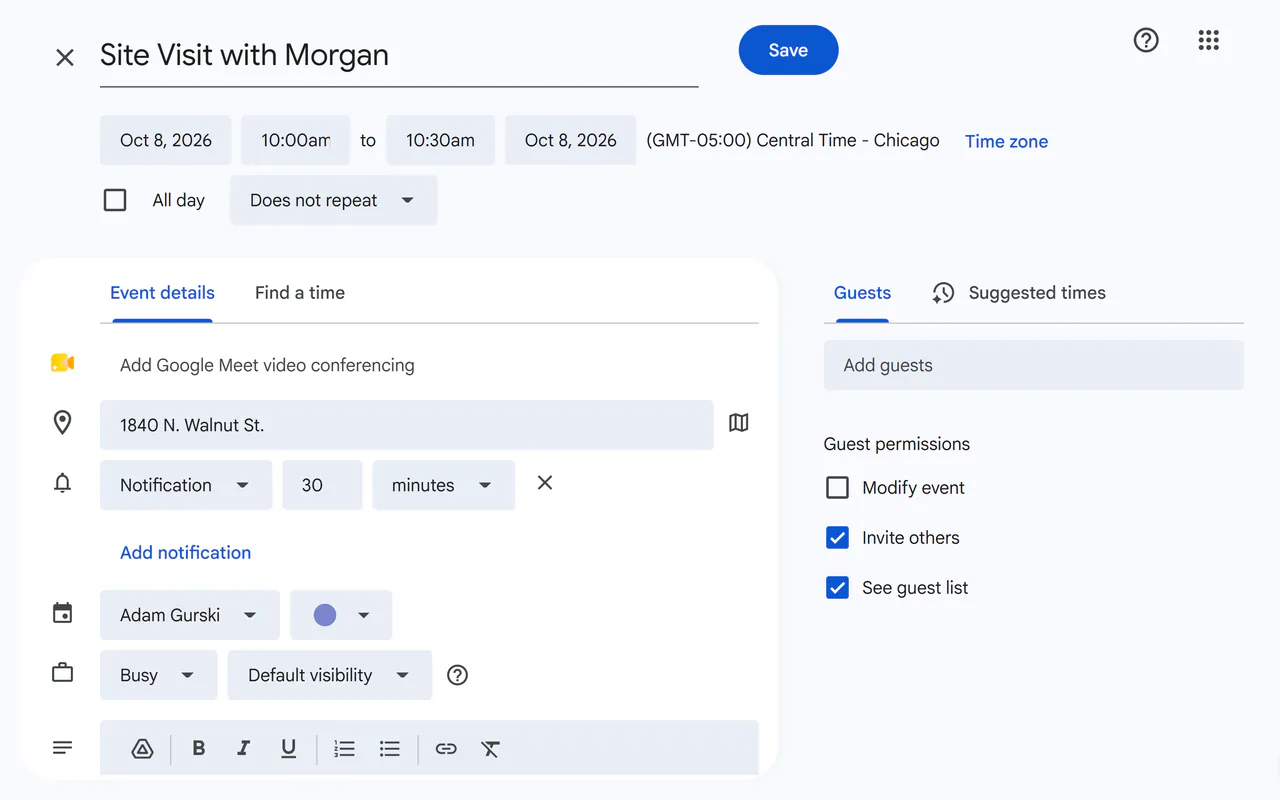
Discuss something like thisA real ChatGPT answer pulls the day, time and place out of a customer’s email. Then Google Calendar’s own screen, filled in and ready to save.
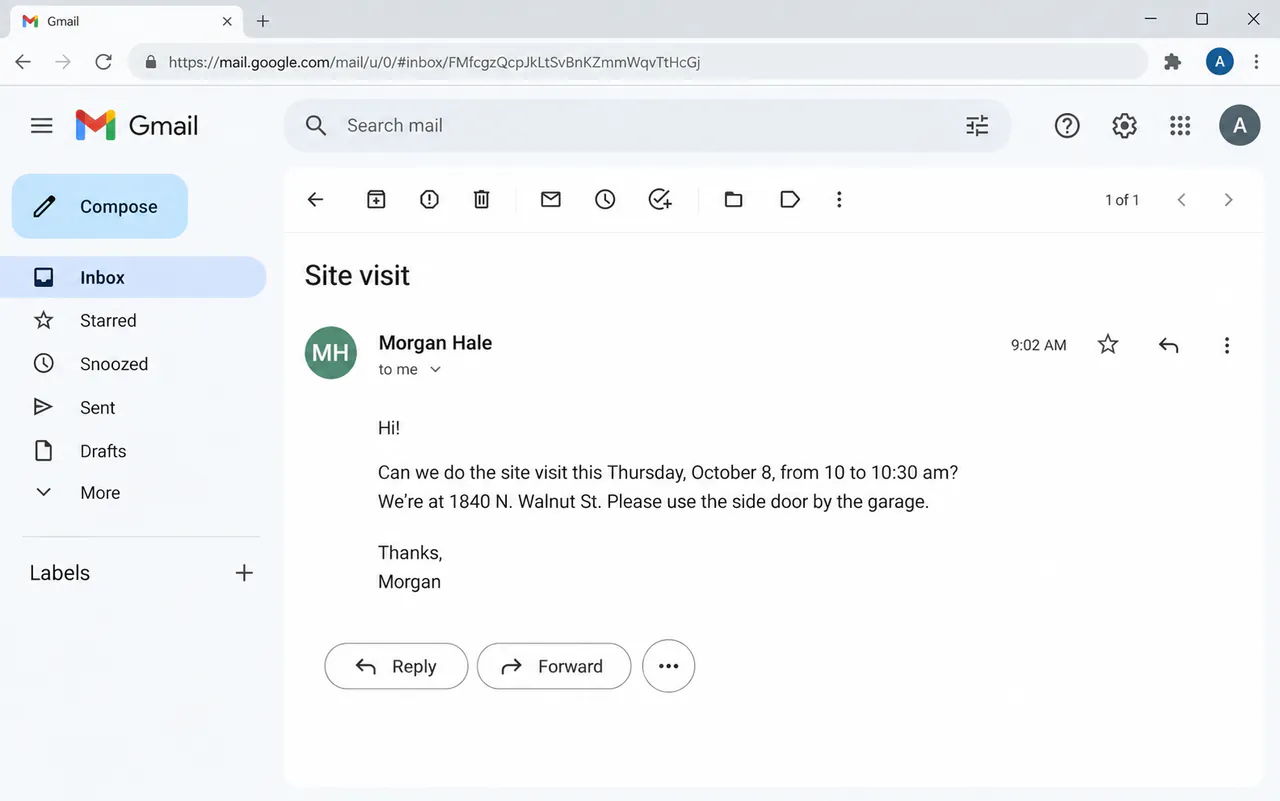
An email with the day, time and address mixed in.
“A customer emailed me this. Turn it into a calendar event I can add: a title, the day and time, the place, and a short note.”
The title, day, time, place and a note, pulled out of the email and ready for Google Calendar. You check the date, then press Save.
ChatGPT’s real screens and answer, replayed · made-up customer · email made with ChatGPT’s image tool · Google Calendar filled in, not saved
The member hub and training companion are interactive concepts. They show a few screens, not finished systems.
Give people one place to find the next event, the right contact, and the document they need.
Meet the volunteer team and choose a small project for the month ahead.
No real event registration takes place.
Event coordinator
Ask about the next gathering.New-member contact
Ask how to get involved.Fictional members. No personal contact details.
Introduce yourself at the next gathering, choose one volunteer activity, and ask the event coordinator if you need help.
Welcome, project updates, volunteer assignments, and next meeting.
The group email, the separate spreadsheet, and the hunt for a shared file. This concept demonstrates selected screens; member accounts and live registration would need a production build.
Discuss something like thisAn interactive practice tool for a team after training. Choose a job left half done or two tasks at once, try a response, and see why it helps—or leaves the problem unresolved.
A teammate leaves a task half finished. Ask what is done, what remains, and who owns the next step.
“I thought you were handling the rest.”What would you say next?
0 of 3 practice steps checked. Nothing is saved.
A practical way to revisit a lesson between sessions. These original exercises demonstrate the interaction; your curriculum and any AI assistance would be scoped separately.
Discuss something like this